CASE STUDY
Timeline :
Nov 25 - Jan 26
Platform :
Chrome plugin & web app
Role :
Product designer
Industry :
Product management tool
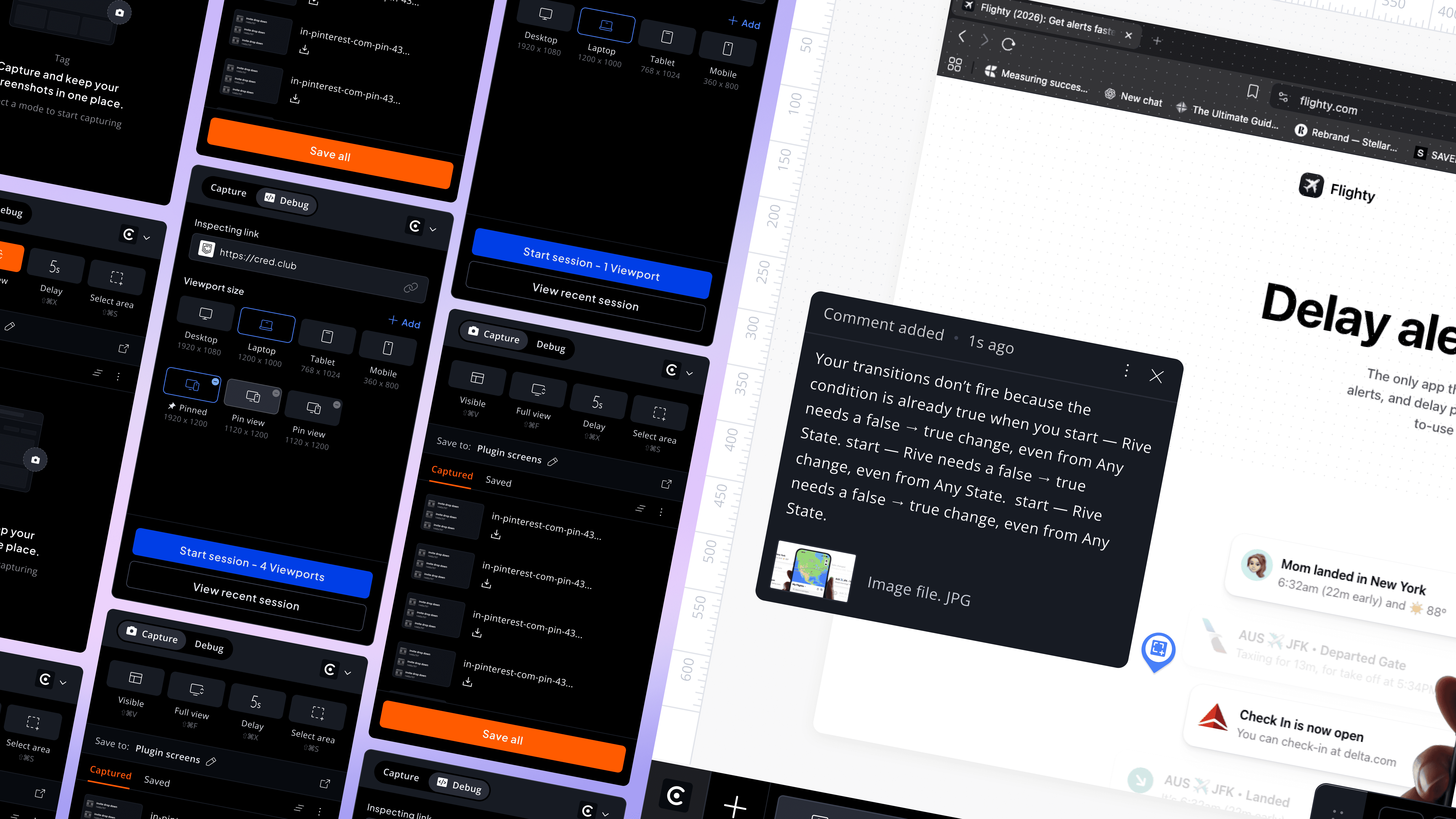
Cassini introduction
When teams review a website, feedback often ends up scattered across screenshots, Slack messages, and docs making it hard to understand what exactly needs fixing.
Cassini brings this entire process into one place by letting you review live websites and leave feedback directly on UI.
Focusing on key parts of the product.
#1
Cassini - chrome plugin
#2
Capture bug feature

Cassini chrome plugin - Preview
Capture mode - Preview
Storyboard
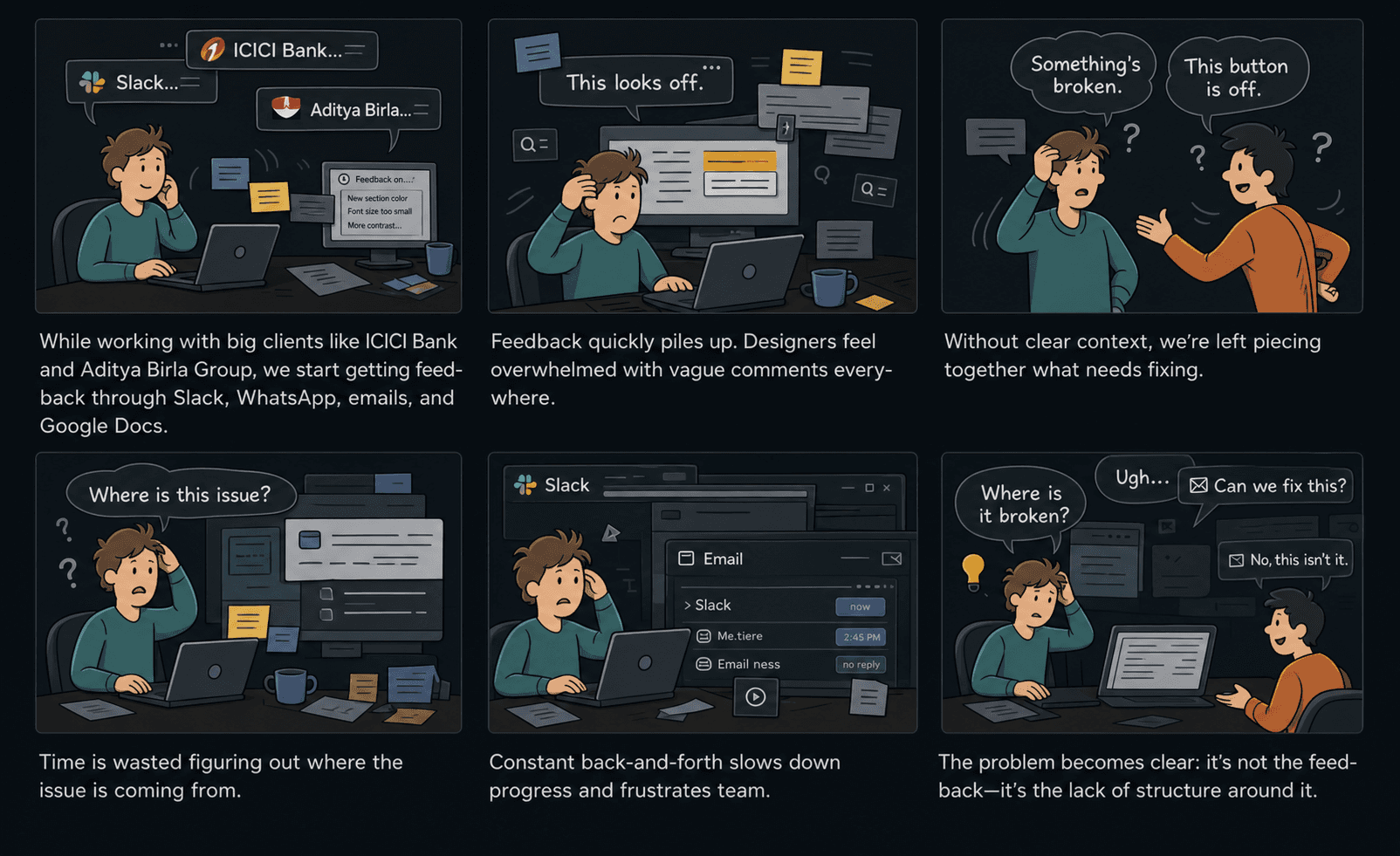
PROBLEM STATEMENT
Key Insights
#1
Feedback wasn’t broken. Context was.
Comments were valid but arrived without viewport, element, or visual proof without asking "where" and "what exactly."
#2
Every clarification loop is a hidden cost.
Each "can you show me?" added hours. Across a sprint, these micro-delays compounded into delayed timelines.
#3
Scattered feedback & old bugs resurfacing
Bugs lived across five slack threads and two docs. Things got missed. Developers got ambushed by old bugs resurfacing.
#4
A dated interface made it worse.
Users questioned if the tool was even maintained. An existing tool where these new features are added. With poor hierarchy it was hard to parse and act on.
Goals alignment
BUSINESS GOALS
Increase activation of high-value features
"Debug mode" and "Dev mode" were Cassini's differentiators — but buried. Surfacing them means users hit their "aha moment" faster, which drives retention and upgradability.
Users were abandoning the product before experiencing its value. A polished, trustworthy interface directly impacts trial-to-paid conversion.
USER GOALS
Find what they need without hunting
Discover features like "debug mode" naturally within their workflow not through documentation or support tickets.
Trust what they're using
Stop second-guessing whether the tool is reliable enough for critical work.
Prototype:
Cassini chrome plugin - Capture & debug mode
Full working prototype
Prototype:
Cassini plugin —to— capture bugs in dev enviroment
Prototype - From plugin to dashboard
Reduced feedback turnaround
40 - 60%
By allowing teammates to comment directly on live builds.
Increased feedback clarity
50%
Reducing ambiguous comments - fewer “what does this mean?”
Cut down communication
Across teams
By centralized feedback in one place, made communication easier.
Enabled faster iterations
2x Quicker
Enabled faster iterations, helping teams move from feedback.
Process
01.
Current Usage & Pain Points
Our team uses Cassini to collaborate with clients, we observed to understand how they use it.
02.
Audited key screens and user flows to identify breakdowns. Reviewing and documenting friction points in FigJam,
03.
Turn problems into effective solutions
Cassini chrome plugin -
Capture & debug mode
While working on websites, we often found ourselves switching between tools taking screenshots for reference or trying to inspect issues across different screen sizes. That’s where the Cassini Chrome plugin fits in.
Focusing on key parts of the product.
#1
Capture mode
#2
Debug Mode
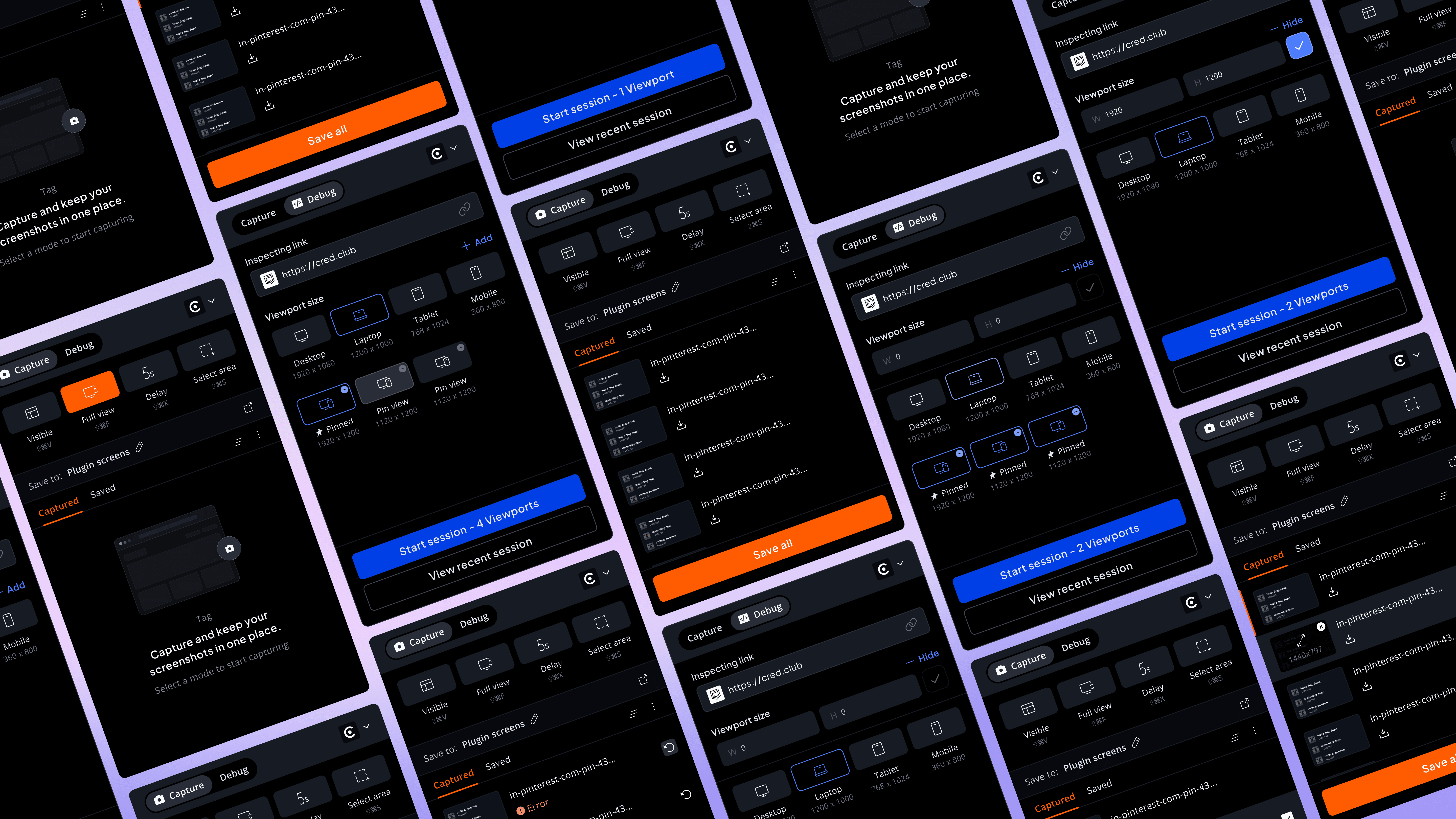
Usability & clarity problems -
Started with low effort and high impact task.
Outdated UI lowers trust and feels unpolished & due to poor hierarchy, content is difficult to consume
Debug mode is hidden, reducing discoverability
Primary CTA lacks visibility and clear anchoring, low contrast hurt clarity and cohesion
Small thumbnails and text-heavy UI increase cognitive load
Too many technical viewport options feel intimidating & cluttered, No delete option makes viewports hard to manage
No clear distinction between default and custom viewports and CTA shifts down as items grow, hurting usability
Custom viewport section shifts position, breaking consistency
Large gap & “Recent Sessions” distract from primary CTA
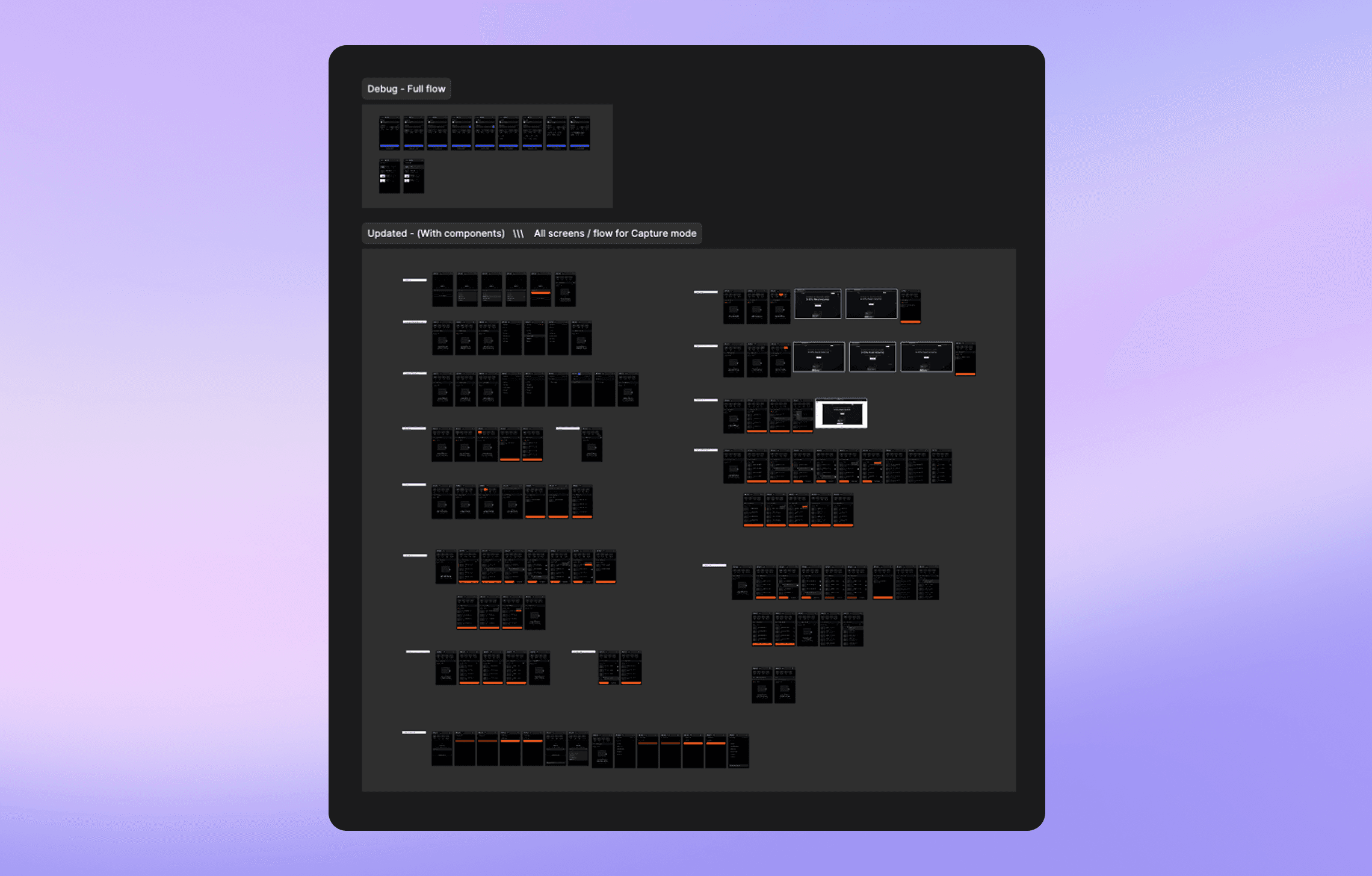
Iterations & userflows
Solutions implemented
Simplified Viewport Selection
While working with ICICI teams, we noticed they were using older systems and specific screen sizes. This led us to introduce predefined and custom viewports in Cassini, ensuring feedback and debugging reflected their actual working environments.
Replaced complex resolution-based options with intuitive device icons for standard viewports, making selection faster and easier to understand.
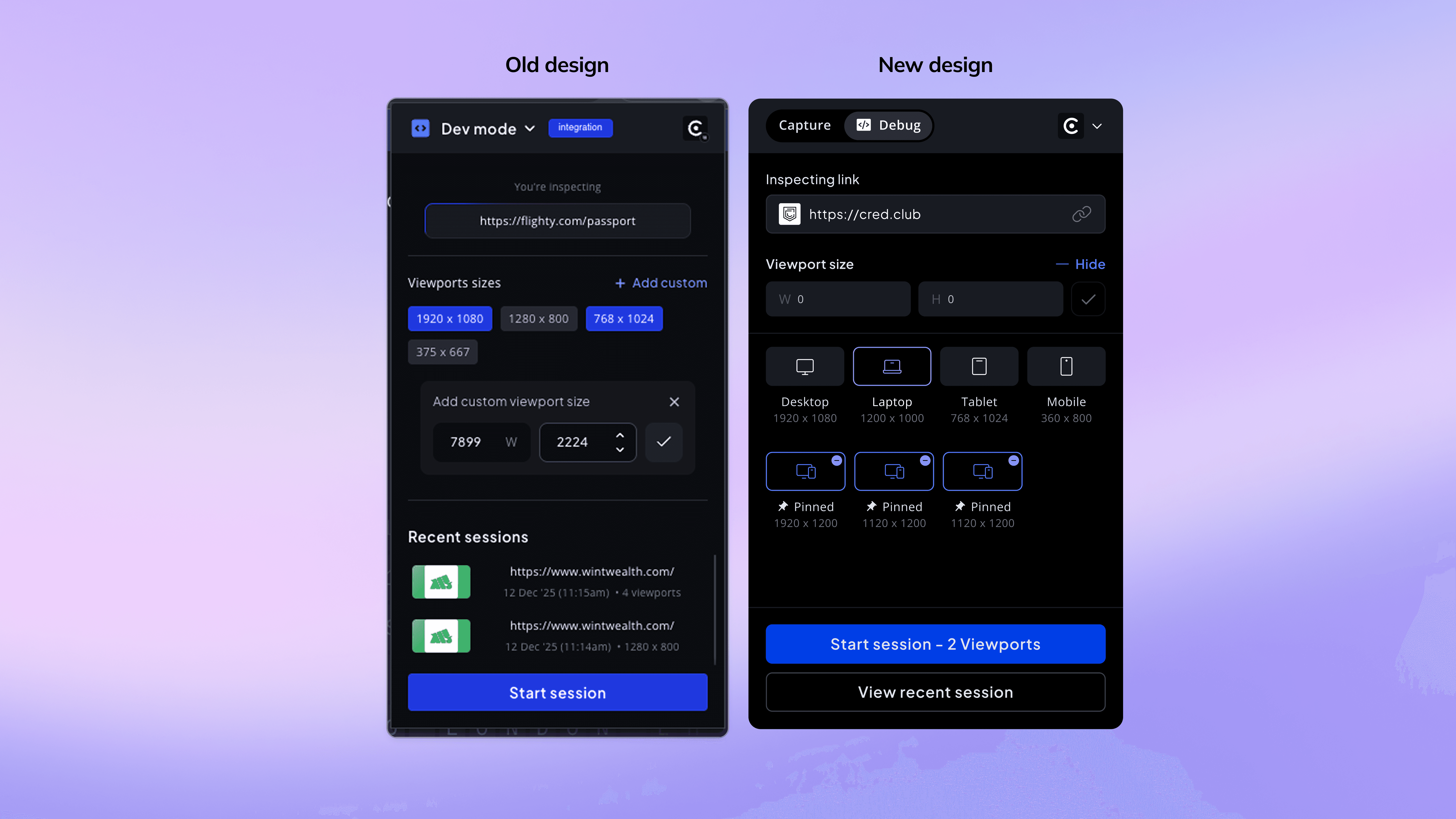
Debug mode - Before and after redesign
Viewport Label & Interaction States
Included both device names and resolutions, using resolution as supporting information rather than the primary identifier.
Designed clear interaction states for selecting, pinning, deselecting, and removing viewports — ensuring flexibility without adding confusion.
Viewport selection simplified
Layout optimization & improved
clarity
Optimized the layout in Capture mode to reduce clutter and use space efficiently.
Made header tabs more compact to prioritize primary content within limited screen real estate. By removing unnecessary elements to reduce noise and improve clarity.
Visual first - decision making
Screen resolution and other actions was moved from the main view into the thumbnail hover state, allowing users to make quicker decisions based on visuals.
This freed up space and allowed for larger thumbnails, making it easier for users to quickly assess and decide on the next action.
A grid optimizes for viewing, a list optimizes for doing. We needed both, so scaled the thumbnail than usual.
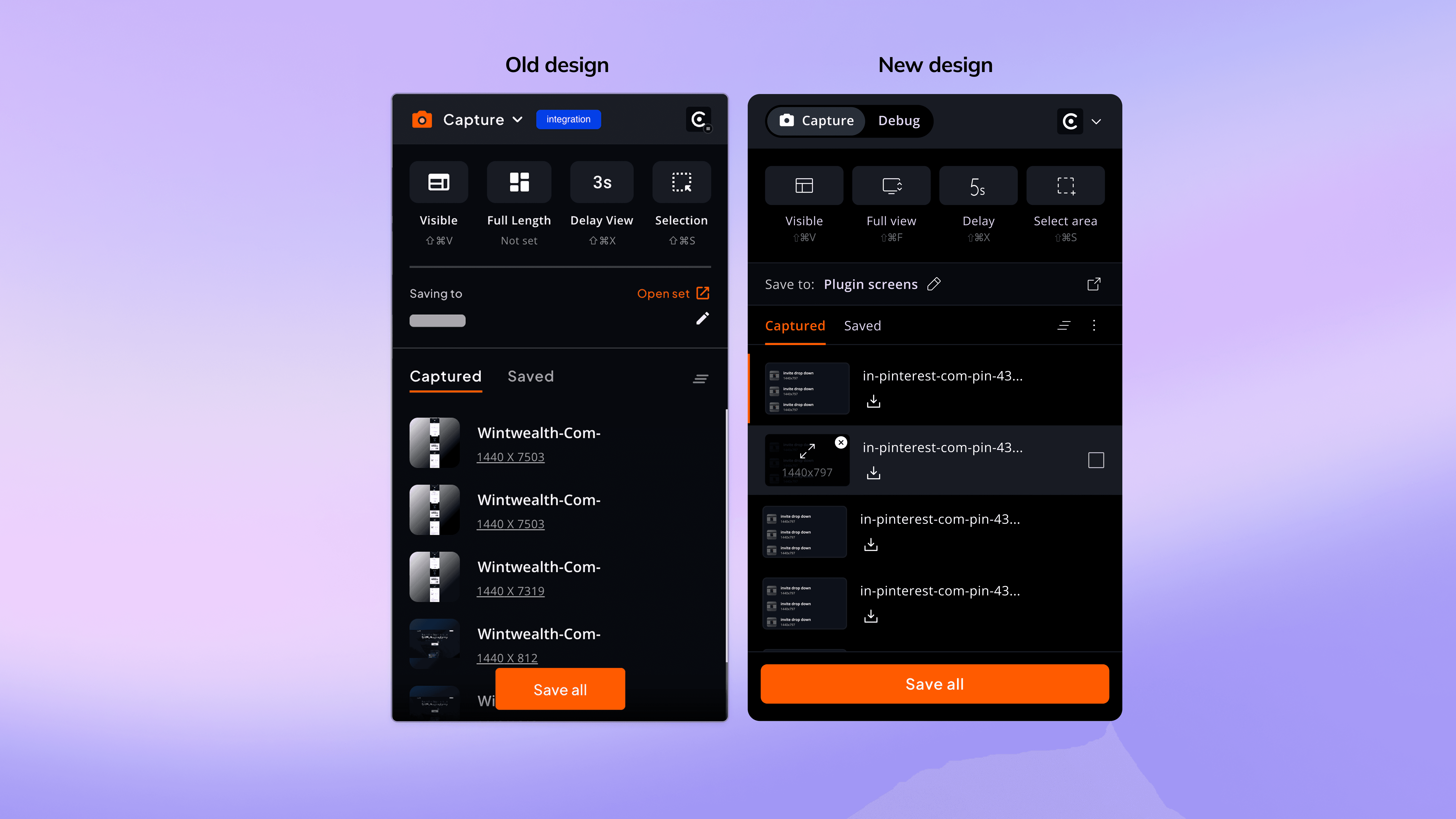
Capture mode - Before and after redesign
Adding utility with delight
Introduced subtle ease-in and ease-out transitions. Creates a smoother, more responsive experience, making the product feel modern and polished.
Subtle animations
Cassini - Dev mode
Most websites block being embedded inside iFrames using X-Frame-Options or Content-Security-Policy headers
So instead, we extended our existing chrome plugin to support "Dev environment" that allows users to interact with real, live websites and web apps. Once a user selects viewports in Debug mode and starts a session, they enter Cassini Dev Mode.
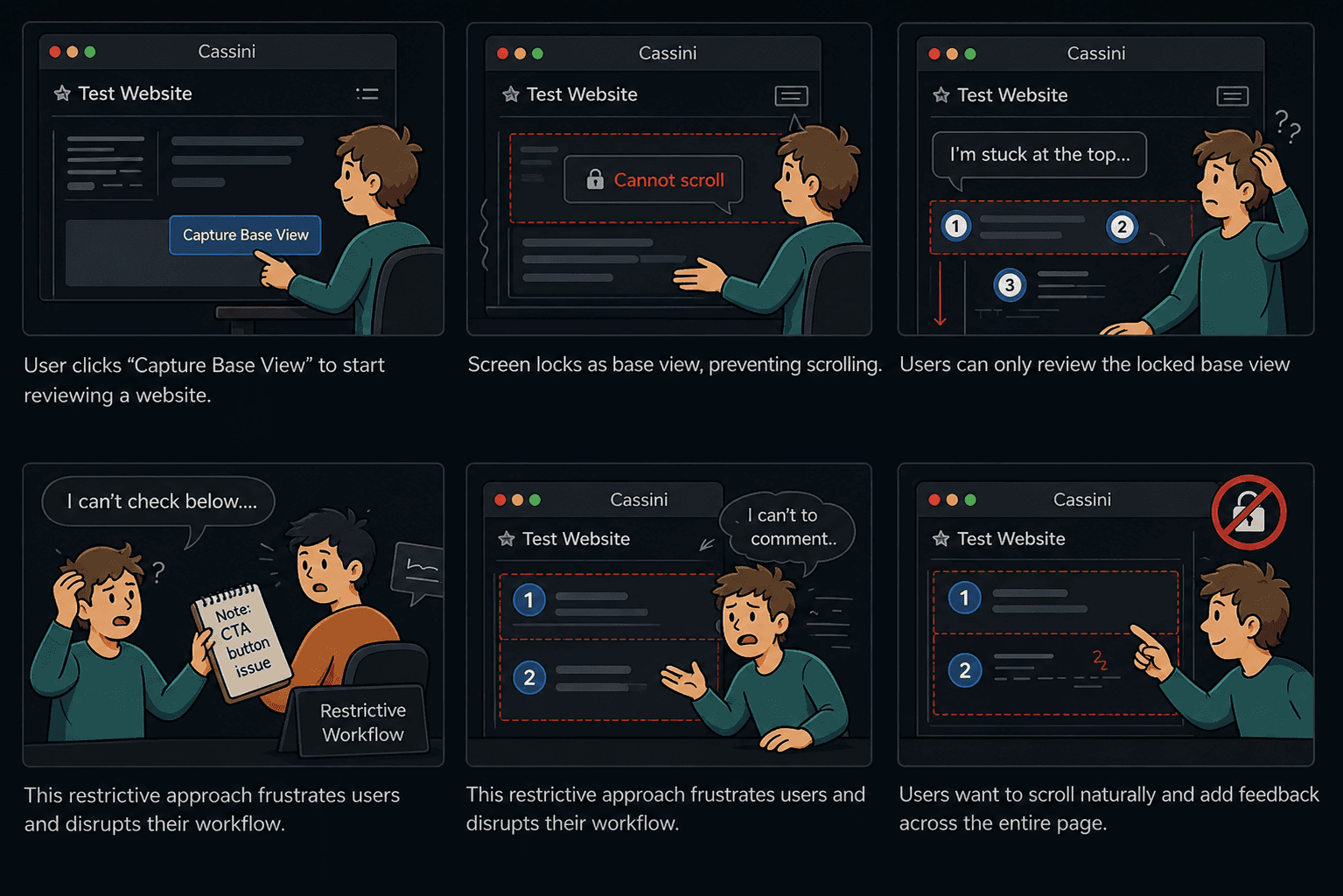
Capture First, Comment Later
(Solution 1)
In the initial approach, users would browse a website within the Cassini environment and click on “Capture Base View” to start reviewing. This would lock the screen as a base view, allowing users to add comments and highlight issues. Once done, the entire view with comments could be saved as a single “view.”
However, this approach introduced friction. As users typically don’t debug in a fixed state, they prefer to scroll freely and add feedback across different areas. Restricting them to a locked base view limited flexibility and disrupted their natural workflow.
Comment First, Capture later
(Solution 2 - Final)
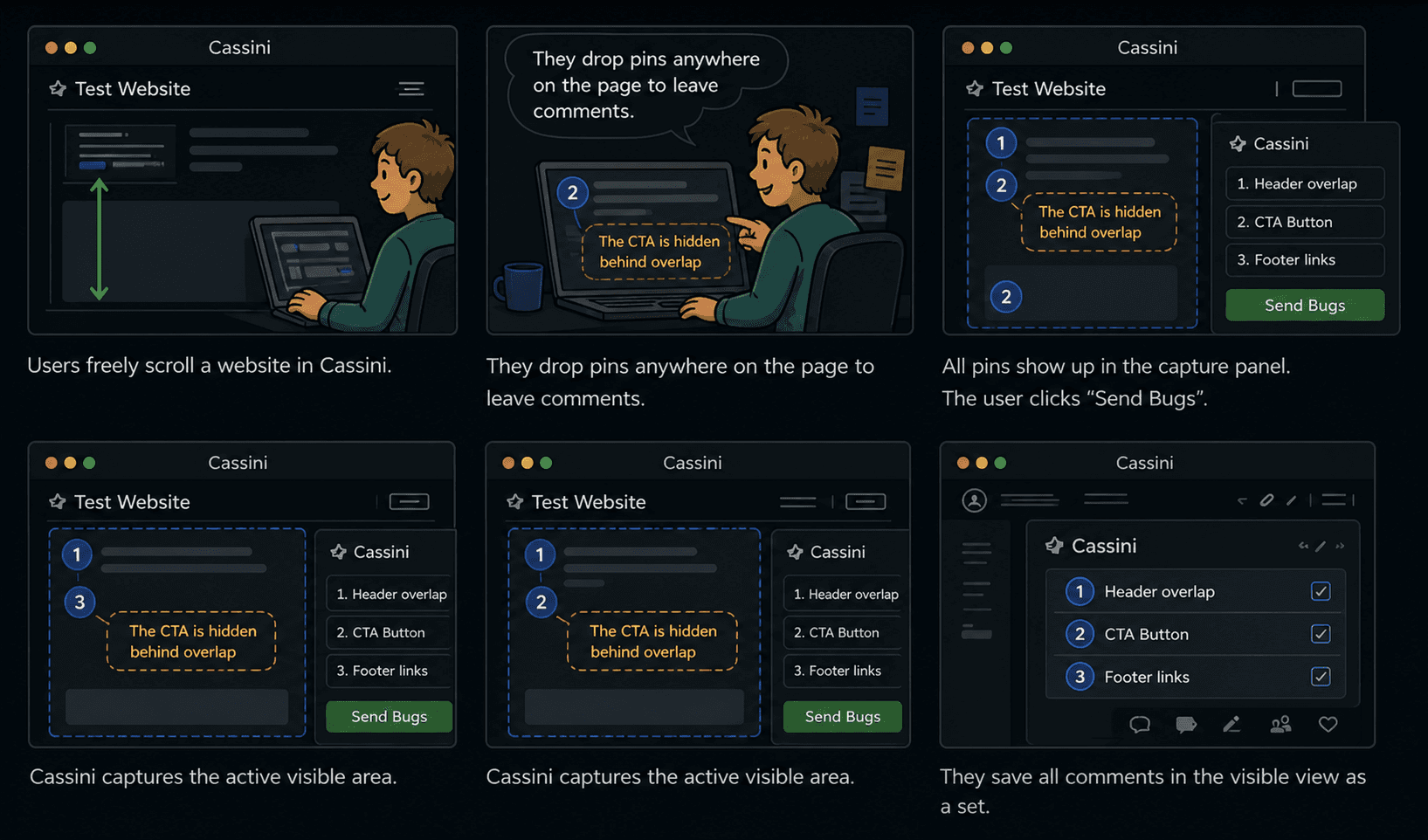
To support a more natural workflow, we shifted to a flexible approach that allows users to scroll freely and add comments anywhere on the page.
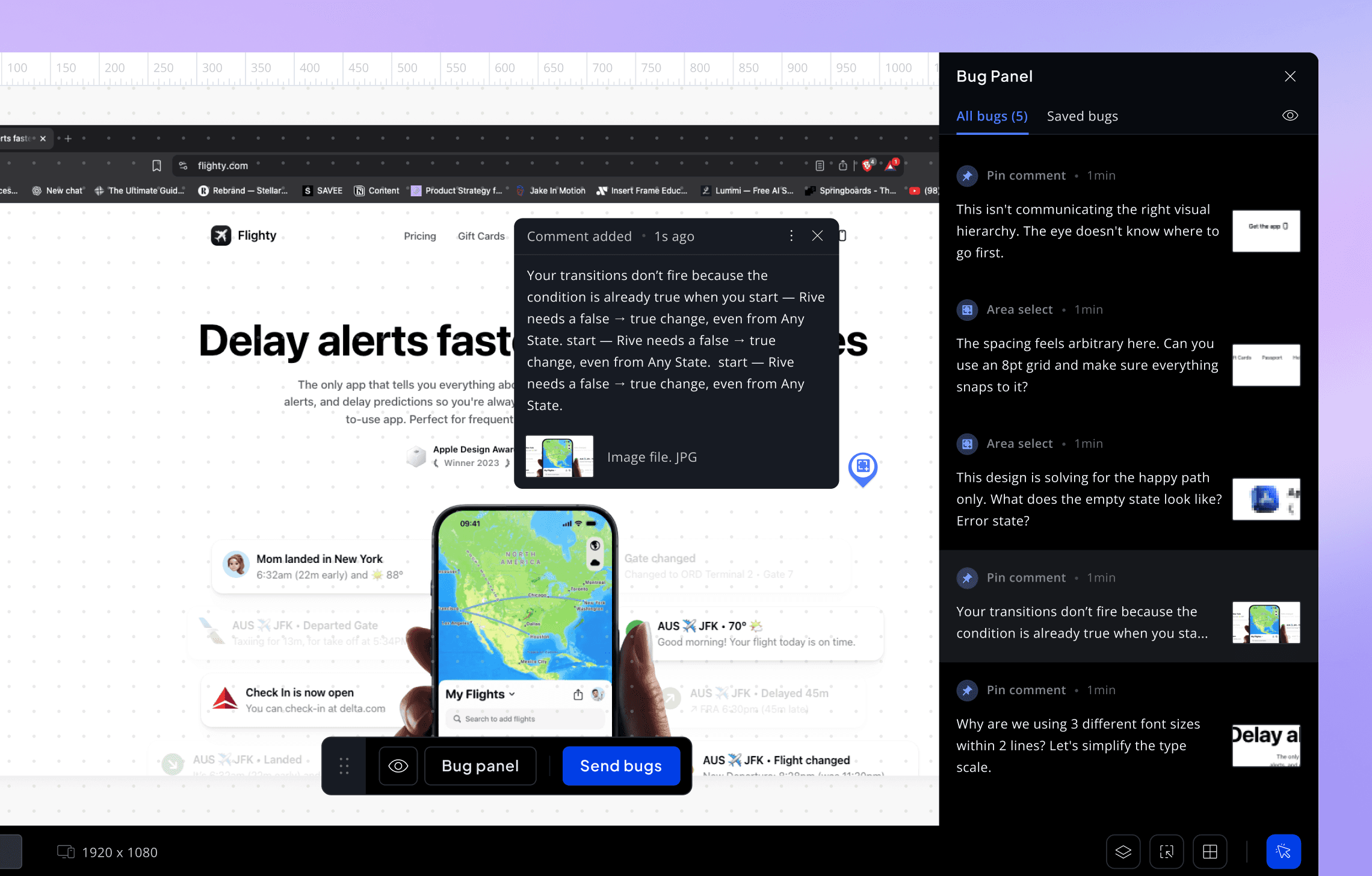
When a user drops a comment, a pin is added directly on the DOM layer, preserving its exact context. Once all comments are added, the user can click on “Send Bugs,” which captures the active visible viewport. All visible pins within the visible viewport are collected and shown in the capture panel, where users can choose a set and save the view.
Each capture is saved as an individual “view.” When opened in Cassini, it displays the screenshot along with all pinned comments—allowing users to review, share, and respond to feedback seamlessly.
Solutions implemented
Your feedback is always tied to the right element.
Works on any page scrollable pages, heavy interactions, dynamic content.
Fewer miscommunications, Less ambiguity, fewer revision cycles.
Feedback is based on how the website actually looks at its intended size not a scaled interpretation of it.
Spacing, overflow, alignment problems — many only show up at the target resolution. If your screen adapts it, you miss them entirely.
Pinned comments & multiple viewport
Bug panels + Comment types
You see all your pins, decide which ones belong, uncheck the ones that don't. What gets captured is intentional, not accidental.
Area select + Pin comment - Without both, reviewers resort to multiple pins or lengthy descriptions to capture what a single selection could show instantly.
Overlapping of tool
(Trade off to ship faster)
Tools like overlay, grids, and inspect work great individually. Combining them with the capture tool added too much complexity, so we kept them separate shipping something reliable mattered more than shipping everything at once.
Rather than ship something that behaves unpredictably, the decision was to keep them sharp individually for now.
Comment and save seemlessly
Speed + clarity
Scroll freely, drop pins as thoughts come, then hit "Send Bugs" when you're done.
You can drop as many pins as you need in one pass, then send everything together as a single view.
What i'd improve
Slack integration
Better bug prioritization layer
Onboarding guidance
Key learnings
#1
Most comments weren't wrong. Just hard to understand without context.
#2
People just scroll, notice things and comment. Forcing steps broke that flow.
#3
Even something like lacking the screen made people drop off or get annoyed.
#4
The moment feedback was pinned on the UI, everything become easier to understand.